Multimedia interface
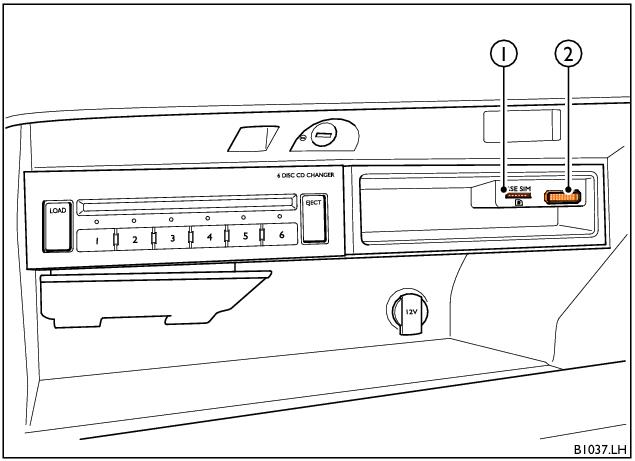
Multimedia interface (Left-hand drive shown)
1 RSE SIM card reader
2 Multimedia interface
The multimedia interface (located in the glovebox), contains the following:
• Jukebox - 64GB memory capacity for storing media files.
• Multimedia interface - Enables connection of a compatible media device to the Infotainment system.
• RSE SIM card reader - Enables the RSE system (and other suitable connected devices) to access to the internet when a suitable SIM card is present.

The SIM card should be inserted into the card slot with the ‘chip’ facing upwards and the ‘cut-off’ corner pointing towards the right.

Note
• Very high or very low temperatures (a common occurrence in a car's interior) can cause damage to a portable player and/or impair its performance. Please do not leave your portable player in the car in case of extreme temperatures.
• Handle the adapter cable with care. Make sure the cable does not become pinched or trapped.
• When removing the adapter cable from an iPhone® or iPod®, ensure that the release buttons on both edges of the adapter plug are pressed simultaneously.
• The SIM card reader located in the glovebox is for the online features of the RSE system only: it is not part of the mobile telephone system.
• The correct operation of the Wi-Fi router (and any devices connected to it), is dependent upon the coverage of your mobile network provider.
• The online connection is subject to charges. Charges are made whenever an internet-based service is actively used. Bentley Motors Limited recommend using a SIM card that includes a data flat rate or data volume package. In some countries, data flat rates that are tailored specifically for this online service are available from mobile network providers. Please check with an authorised Bentley dealer and your mobile network provider if you have any questions regarding availability.
- Related Topics